v3.4.6: Limit the diff to an area of the board
A minor revision that lets you compare just part of a board, and fixes voids in how some files are drawn.
You can now limit a comparison to an area you choose. Click Limit Diff Area in the Diff Summary panel and drag a box on the board. On every layer, the status and change percentage then count only what is inside the box, so tooling marks and text around an array no longer affect the result. Use Whole Board goes back to the full comparison.
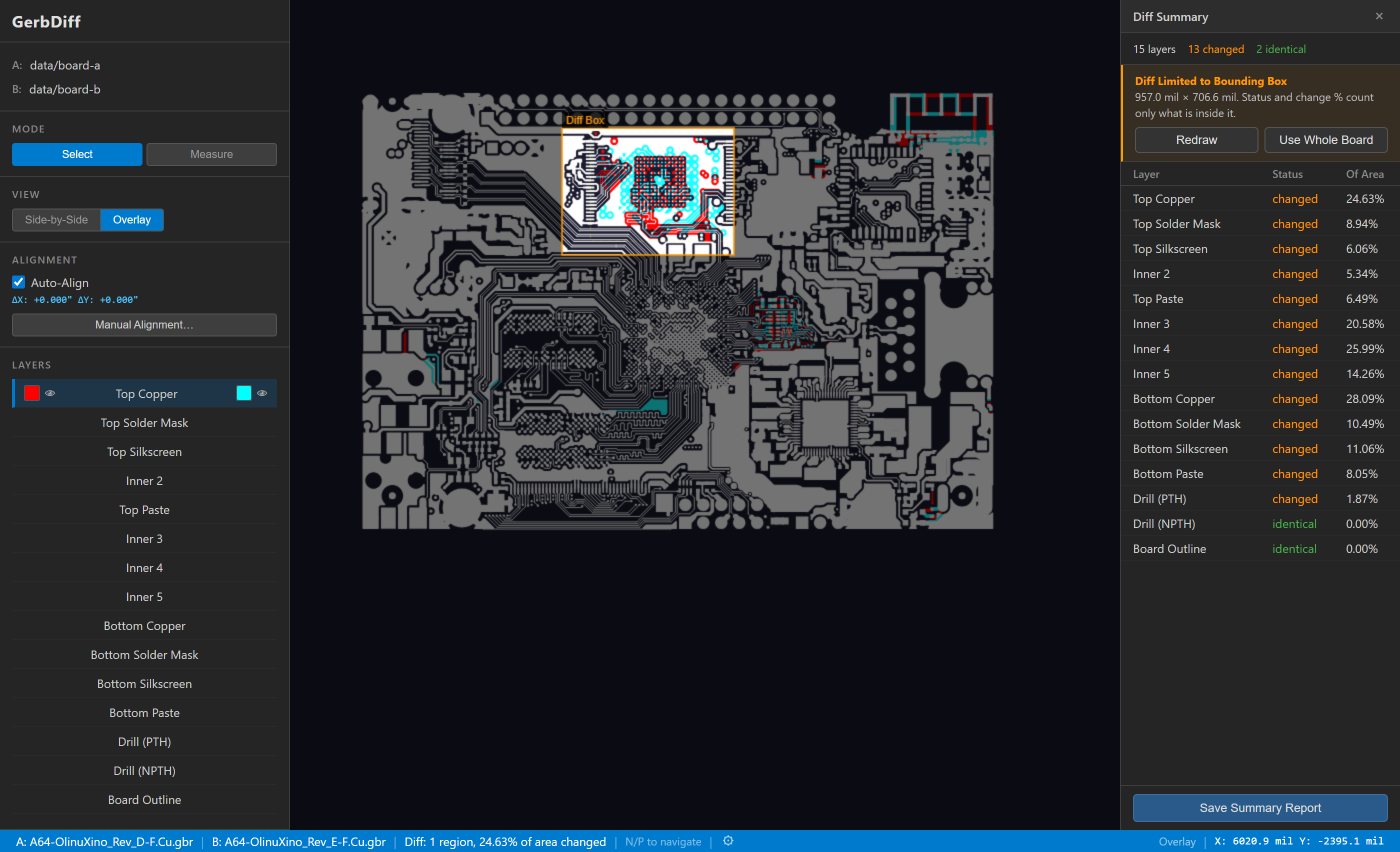
The percentage becomes a share of the box, so the same change reads higher than it does for the whole board. The box is saved in .gdf files and shown in Summary Reports, and the command line honors a box saved in a file opened with --gdf.
This release also fixes several cases that could leave voids in the drawing. Arcs and diagonals drawn with rectangular apertures now paint their full width, arcs in low-precision files now reach their end points, and overlapping outlines in a filled area now stay solid, as the Gerber specification defines. Change percentages may shift slightly on affected files.
Thanks to the user who suggested the area limit and reported the voids.